
TL;DR:
- Online ordering is essential for restaurants and must be supported by the right digital infrastructure. Using a multi-channel strategy that combines marketplaces and direct platforms can reduce costs and increase customer ownership. Improving mobile design and ownership of customer relationships are key to growing online orders and profits.
Getting online orders is the process of enabling customers to place food orders digitally through platforms that handle ordering, payment, and fulfillment in one flow. For restaurant owners, mastering this process is no longer optional. Digital ordering now drives a significant share of restaurant revenue, and the gap between operators who do it well and those who do not is growing fast. This guide covers the tools, mobile optimization tactics, marketing strategies, and setup steps you need to increase online sales starting today.
How to get online orders: the tools and platforms you need
The right digital infrastructure is the foundation of every online order you receive. Without it, even great marketing sends customers to a dead end.
Your ordering channels fall into three main categories:
- Direct website ordering — customers order from your own site, you pay no commission, and you own the customer data
- Third-party marketplaces — high discovery potential but costly commission structures of 15%–30% per order
- Social media and AI ordering — emerging channels via Google AI and Instagram that push orders directly from discovery moments
The commission math is brutal if you ignore it. Restaurants paying 15%–30% per order on third-party apps can lose over $49,000 annually compared to a flat-fee direct ordering platform at the same volume. That is not a rounding error. That is a full-time employee’s salary walking out the door every year.
The best approach is a multi-channel strategy: use marketplaces to attract new customers, then convert those customers to your direct channel for repeat orders. Here is how the two models compare on key feature categories:
| Feature category | Third-party marketplace | Direct ordering platform |
|---|---|---|
| Commission per order | 15%–30% | $0 (flat monthly fee) |
| Customer data ownership | Marketplace owns it | You own it |
| Brand control | Limited | Full |
| Discovery reach | High | Requires your own marketing |
| Repeat order profitability | Low | High |
Your ordering software must integrate with your POS system and kitchen printers. Without that connection, you get inventory mismatches, missed tickets, and angry customers. Choose a platform that syncs in real time.
How to optimize your menu and mobile experience to increase orders
Over 75% of digital food orders come from mobile devices. That single fact rewrites every design decision you make for your ordering experience. If your menu is slow, hard to scroll, or buried behind a PDF, you are losing orders before customers even see your food.
Mobile optimization is the fastest lever you have to fix order abandonment. Start with these non-negotiables:
- ✅ Visible “Order Now” button — it must appear without scrolling on any phone screen
- ✅ HTML menu, not a PDF — PDFs load slowly and break on mobile; HTML menus load fast and display cleanly
- ✅ Large, high-quality food photos — one great photo of a dish sells more than a paragraph of description
- ✅ Short category names — “Burgers,” “Bowls,” “Drinks” beats “Our Signature Handcrafted Selections”
- ✅ Guest checkout option — forcing account creation before checkout drives abandonment; make guest checkout visible and easy
Menu psychology also plays a real role here. Placing a high-margin anchor item at the top of each menu category increases average ticket size without any upselling pressure. Customers default to what they see first. Put your most profitable item there.
Pro Tip: Test your entire ordering flow on three different phones before you launch. What looks fine on a desktop can be completely broken on a four-year-old Android.
Check the restaurant website improvement checklist to audit your current setup against these standards.
What marketing strategies attract and convert online customers?
Traffic alone does not pay the bills. The revenue equation is simple: Revenue = Traffic × Conversion Rate × Average Order Value. Most restaurant owners focus only on traffic. The smarter move is to work all three levers at once.
Here are the strategies that move all three numbers:
-
Build your email and SMS lists. Owned channels deliver higher ROI than paid acquisition for repeat customers. Send weekly specials, limited-time offers, and new menu items directly to people who already love your food.
-
Claim and optimize your Google Business Profile. Google AI now surfaces restaurant ordering options directly in search results. A complete, accurate profile with photos and a direct order link captures customers at the exact moment they are hungry.
-
Run retargeting ads. Customers who visited your site but did not order are your warmest audience. A well-placed Facebook or Instagram ad showing your best dish brings them back. Ionhospitality’s free retargeting ads playbook walks you through the exact setup.
-
Set a free delivery threshold. Offering free delivery on orders over a set amount (say, $35) increases average order value without discounting your food. Customers will add an extra item to hit the threshold.
-
Use social media for discovery, not just branding. Short video clips of your food being prepared or plated stop the scroll and drive direct traffic. Interactive ads with a direct “Order Now” link convert that attention into revenue immediately.
Pro Tip: Simplifying your checkout flow, cutting it from five steps to three, can produce 20%–50% growth in completed orders without spending a dollar more on ads.
Step-by-step guide to setting up your online ordering system
Setup mistakes cost you orders for months. Follow this sequence to get it right the first time.
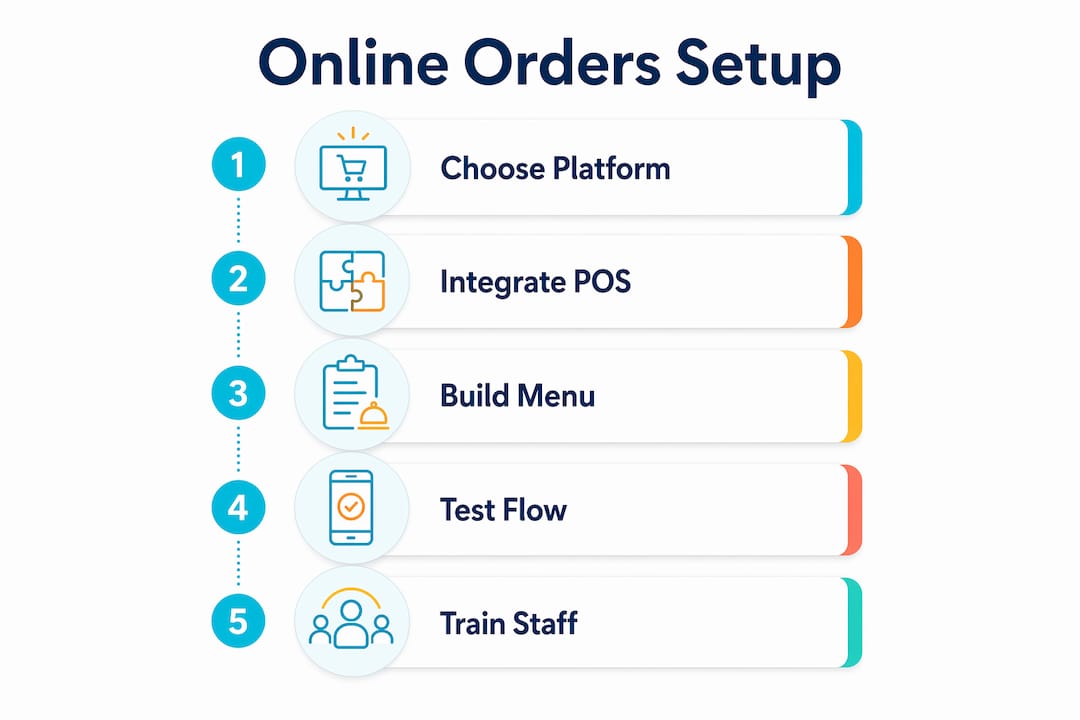
Step 1: Choose your ordering platform.
Pick a platform that integrates with your existing POS. Confirm it supports real-time menu syncing, guest checkout, and mobile-first design out of the box.
Step 2: Integrate with your POS and kitchen printers.
Failing to sync your online menu with your POS leads to “item unavailable” errors and customer loss. This integration is not optional. Test every menu item before going live.
Step 3: Build your digital menu.
Use HTML, not PDFs. Add photos to your top 10 items at minimum. Place high-margin items at the top of each category. Write short, clear descriptions.
Step 4: Test the full ordering flow.
Order from your own restaurant on multiple devices. Check the mobile experience on iOS and Android. Confirm guest checkout works. Verify that orders print correctly in the kitchen.
Step 5: Train your staff.
Your team needs to know how incoming online orders appear, how to prioritize them alongside in-house tickets, and what to do when an item runs out mid-service.
Step 6: Launch and promote.
Announce your online ordering on every channel you own: email list, Instagram, Facebook, Google Business Profile, and in-store signage. Give customers a reason to try it, like a first-order discount or a free side.
Watch out for these common pitfalls:
- ❌ Forcing account creation before checkout
- ❌ Slow-loading menus caused by uncompressed images
- ❌ Menu items that exist online but are not available in-store
- ❌ No confirmation email or SMS sent to the customer after ordering
- ❌ Ignoring mobile marketing fundamentals during the launch phase
Key Takeaways
The most effective way to get more online orders is to combine a direct ordering platform with mobile-first design, owned marketing channels, and a fully integrated POS setup.
| Point | Details |
|---|---|
| Direct ordering saves money | Switching from third-party apps to a direct platform can save over $49,000 per year at 500 orders per month. |
| Mobile design drives conversions | Over 75% of food orders come from mobile; your “Order Now” button must be visible without scrolling. |
| Menu layout affects revenue | Place high-margin items at the top of each category to increase average ticket size without upselling. |
| Owned channels beat paid for repeat orders | Email and SMS lists deliver higher ROI than paid ads for customers who have already ordered from you. |
| Integration prevents lost orders | Real-time POS sync stops “item unavailable” errors that kill customer trust and repeat business. |
Why owning your customer relationship is the real competitive edge
Here is what I see restaurant owners get wrong more than anything else: they treat third-party marketplaces as a permanent strategy instead of a discovery tool. Marketplaces are great for getting your name in front of new customers. They are terrible for building a business you actually control.
Every order that goes through a marketplace is a customer you do not own. You do not have their email. You cannot text them a Tuesday special. You cannot retarget them when they have not ordered in three weeks. The marketplace owns that relationship, and they will charge you 15%–30% every single time that customer comes back.
The restaurants I see winning right now use marketplaces to acquire customers and then work hard to convert those customers to direct ordering. A simple card in the delivery bag that says “Order direct and save $5” is enough to start that shift. Over time, your direct channel grows, your commission costs drop, and your margins recover.
The other thing I push hard on is continuous menu and checkout testing. Most restaurant owners set up their online ordering once and never touch it again. Your menu should be updated seasonally. Your checkout flow should be tested every few months. One friction point you missed in the setup phase could be costing you dozens of orders a week.
The math on this is not complicated. Fix the mobile experience, own the customer data, and market to your list. That is the whole playbook.
— Doug
How Ionhospitality helps restaurants grow online orders
Restaurant owners who want more online orders without the guesswork of figuring out digital marketing alone have a clear option.
Ionhospitality is a restaurant marketing and advertising agency that builds the systems restaurants need to attract customers, drive direct orders, and grow without paying commissions. From social media advertising that puts your food in front of hungry local customers to custom mobile-optimized websites built to convert visitors into paying orders, Ionhospitality handles the execution so you can focus on running your kitchen. Everything is done for you, with zero commissions on orders. Schedule a discovery call to see exactly what a tailored strategy looks like for your restaurant.
FAQ
What is the fastest way to get more online orders?
Fix your mobile ordering experience first. Over 75% of food orders come from mobile devices, so a slow-loading menu or a buried “Order Now” button is the most common reason customers abandon before completing an order.
How do I reduce commission fees on online orders?
Switch repeat customers from third-party marketplaces to a direct ordering platform. Direct platforms charge a flat monthly fee instead of 15%–30% per order, which can save a restaurant over $49,000 per year at moderate order volume.
Does guest checkout really make a difference?
Yes. Forcing customers to create an account before checkout is one of the top causes of order abandonment. Offering a visible guest checkout option removes that friction and directly increases completed orders.
What should I put at the top of my online menu?
Place your highest-margin item at the top of each menu category. Customers default to what they see first, and this layout choice increases average ticket size without any upselling required.
How do email and SMS lists help increase online orders?
Owned channels like email and SMS deliver higher ROI than paid ads for existing customers. Sending weekly specials or limited-time offers directly to your list drives repeat orders from people who already trust your restaurant.

Add a Comment